Skip to content
Mbox Viewer

mboxShell

The free terminal tool behind Mbox Viewer. Open, search and export MBOX files of any size — right from your shell, on Linux, macOS, FreeBSD and Windows.

Latest v0.6.2 Free & open source Written in Rust MIT
mboxshell
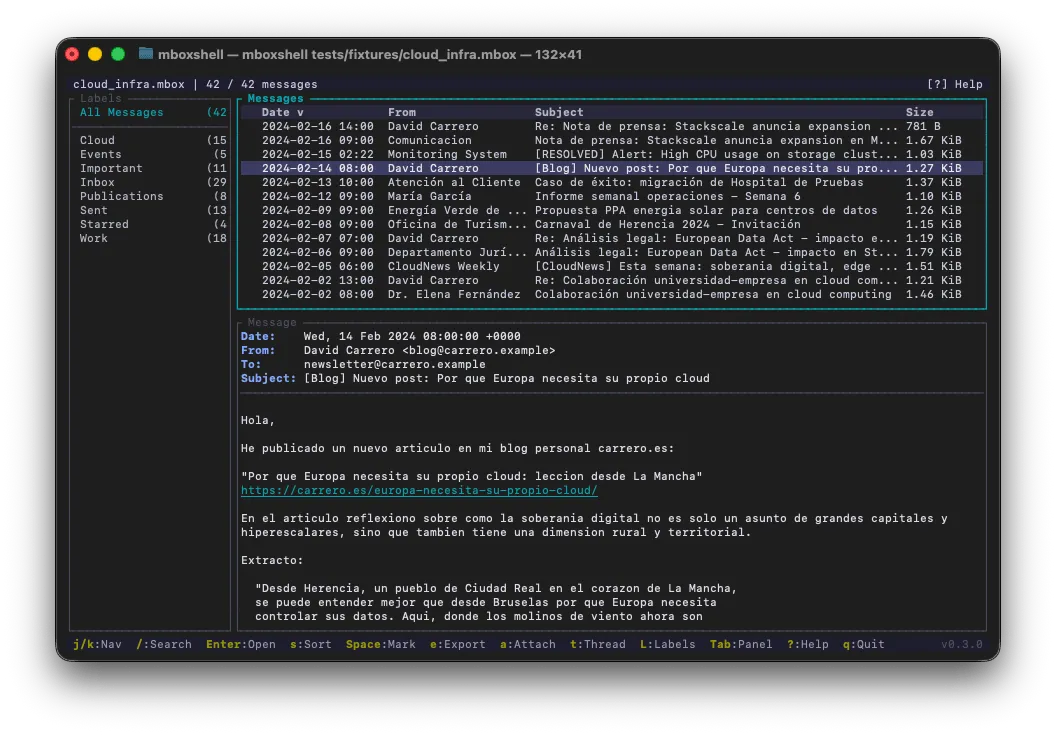
mboxShell running in a terminal, showing an MBOX archive with its message list, folders and reading pane.

A full MBOX toolkit in your terminal

Everything you need to work with huge email archives — reading, searching, threading and exporting — with no GUI and no cloud.

Any file size

A streaming parser with a 1 MB buffer opens 50 GB+ Gmail Takeout backups while keeping RAM around 500 MB.

Sub-second re-opens

A persistent binary index — verified with SHA-256 — reopens even the largest archive in under a second.

Field-based search

Filter with from:, subject:, date:, body:, has:attachment and label:, plus OR and exact phrases — in the TUI or from the command line.

Gmail labels

Detects X-Gmail-Labels and turns them into virtual folders you can browse and filter by.

Conversation threading

Groups related messages into conversations using the classic JWZ threading algorithm.

Export anywhere

Save messages as EML, CSV, TXT or HTML, and extract attachments individually or in bulk.

Merge & dedupe

Combine several MBOX files into one, with optional deduplication so nothing is imported twice.

Full terminal UI

A ratatui-based TUI with three layout modes, vi-style navigation and shell completions for bash, zsh, fish, PowerShell and elvish.

Cross-platform & bilingual

A single ~5 MB binary with no runtime dependencies. Runs on Linux, macOS, FreeBSD and Windows, with an English/Spanish interface.

What's new

The three most recent releases. The latest, v0.6.2, shipped on August 7, 2026.

v0.6.2

August 7, 2026

Traceable merges, and docs that match the tool

  • merge --source-header now records the mailbox name you know. Apple Mail exports a mailbox as a folder "Inbox.mbox" holding a file called literally "mbox", so every message got stamped X-Mbox-Source: mbox — useless for the one thing the header exists for. Mailboxes that would share a name are told apart by their folder.
  • The docs described a merge --dedup flag that does not exist: deduplication is on by default and the real flag is --no-dedup. Both READMEs and both manuals are corrected, and --source-header — which shipped undocumented in 0.6.1 — is now covered.
  • The merge summary line "Tagged with source" was hardcoded in English while every other line was translated — it now goes through the catalogue too. 7 new tests (202 in total).
Release notes v0.6.2

v0.6.1

July 6, 2026

Trace every merged message back to its mailbox

  • New merge --source-header option: every merged message gets an X-Mbox-Source: <origin file> header as its first header, so a combined archive stays traceable. It reuses the message's own line endings, preserves a leading BOM, and sanitizes the file name so a crafted one can't inject extra headers.
Release notes v0.6.1

v0.6.0

July 3, 2026

Interactive performance on very large mailboxes

  • The message view no longer re-wraps the whole body on every frame — styled lines are cached and reused.
  • Incremental search is debounced into a single pass that runs after typing settles (~150 ms).
  • Selecting a message no longer deep-copies its decoded body; bodies are shared by reference for cheaper selection.
Release notes v0.6.0
Read the full changelog

One command away

mboxshell
$ mboxshell archive.mbox
# Open the interactive terminal UI
$ mboxshell search archive.mbox "from:jane has:attachment"
# Search straight from the command line
$ mboxshell export archive.mbox -f eml -o out/
# Export messages to EML, CSV, TXT or HTML
$ mboxshell merge a.mbox b.mbox -o all.mbox --source-header
# Merge files — duplicates removed by default (--no-dedup to keep them), noting which mailbox each message came from
$ mboxshell attachments archive.mbox -o files/
# Extract every attachment at once

Install it

Grab a pre-built binary for Linux, macOS, FreeBSD or Windows from the releases page, or build it yourself with Cargo:

$ cargo install --git https://github.com/dcarrero/mboxshell.git

The open-source engine behind Mbox Viewer

Mbox Viewer for Mac and Windows grew out of mboxShell. The app wraps the same idea — reading MBOX files of any size, fully offline — in a polished native interface with search, labels, threading and EML support. Prefer the terminal? mboxShell is free and MIT-licensed.

github.com/dcarrero/mboxshell